If you have ever sat staring at your analytics wondering why a beautiful new page is getting zero love from Google, you are not alone. This is usually where the question what is crawling in SEO shows up in your mind. It matters a lot more to your rankings and revenue than most people realize, which is why understanding the process can quickly move you ahead of your competitors.
An SEO company should be able to quickly identify this information in Google Search Console. It is an important piece of the puzzle when doing SEO.
Crawling sounds technical, but at its core, it is pretty simple. It is about whether search engines can actually find and understand the pages you worked so hard to build. If that first step breaks, everything else you do for search optimization stalls out before it ever gets a chance.
We will examine the mechanics of how bots access your site. You will learn how to optimize your technical foundation to aid discovery. This guide helps you take control of your search visibility.
Table of Contents:
- What Is Crawling In SEO, Really?
- Why Crawling Matters So Much For Your Business
- How Search Engines Crawl The Web
- Google, Other Search Engines, And Why Crawl Budget Matters
- How Crawling Differs From Indexing And Ranking
- How To Check If Your Site Is Being Crawled
- How Sitemaps Help Crawlers Find Your Best Pages
- Robots.txt, Meta Robots, And X Robots Tags
- HTTP Status Codes And Their Impact On Crawling
- Improving Crawl Efficiency On Your Site
- Using Google Search Console To Monitor Crawling
- How User Behavior Ties Back To Crawling And Rankings
- What Is Crawling In SEO For Local Businesses
- How Keyword Research And Content Quality Support Crawling
- Recovering Pages That Dropped Out Of The Index
- Why Most Of This Still Comes Back To Google
- Conclusion
What Is Crawling In SEO, Really?
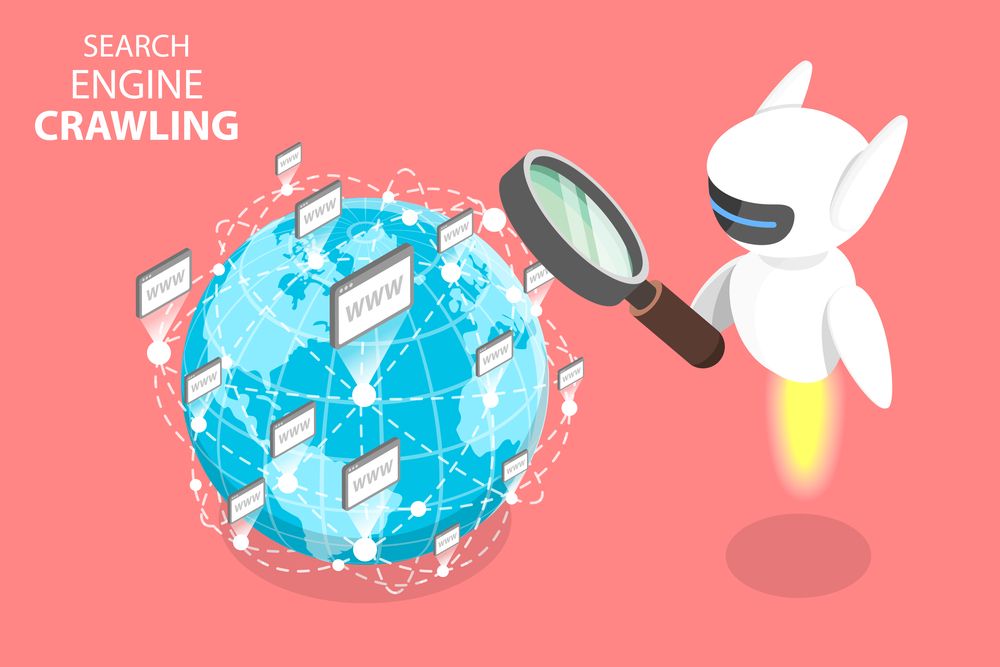
Picture a huge army of bots that never sleep and never stop clicking links. That is how Google explains their system of crawlers. Their own description is that crawlers move from page to page and store information in the Google Search index by following links and collecting what they find on public pages on their How Search Works guide.
These bots are often called spiders, search engine crawlers, or just a web crawler. They follow links, focus on discovering URLs, and then send what they find back to giant databases. This database is often referred to as Google Caffeine, which Google describes as their index of discovered URLs in their announcement of Caffeine.
Engine crawlers act as the scouts for the search engine. They do not rank the content yet; they simply gather the raw data. Search engine bots crawl across billions of documents to keep their records fresh.
Only after a page is crawled can it be considered for indexing and ranking. So, website crawling is step one of the entire SEO crawl process. If your site has crawl issues, it is like locking the front door and then wondering why guests never arrive.
Why Crawling Matters So Much For Your Business
Across the globe, people are searching constantly. One analysis estimates that over 40,000 Google searches happen every second, adding up to billions of searches a day based on reported SEO statistics. Almost half of users even say they rely on Google to find new products or items they have never seen before according to HubSpot marketing research.
If engine bots struggle to reach or understand your content, you are quietly losing a share of all that intent. You can write amazing content and build a beautiful brand, but if the bots crawl fails, your audience never will see it. Poor search performance often stems from these initial technical roadblocks.
That is why any serious strategy for a business owner has to start with crawling and indexation. This foundation is one of the most critical ranking factors. You cannot chase advanced tactics without this base.
How Search Engines Crawl The Web
Search engines use specialized software to crawl pages. Google calls their different bots Google crawlers and explains that these bots follow links across the web and discover new URLs in an automated way in their crawling and indexing overview.
The crawling process starts with a list of URLs that engines already know about. From those, crawlers request the page, scan the HTML, and then move through every link they can find. They extract links from the code to build their queue for future visits.
The pattern repeats over and over until bots have followed as many links and pages as they can reach. During a Googlebot crawl, the system must make decisions about where to go next. It prioritizes known high-quality pages and new discoveries.
The page’s content they gather, plus signals from links and response codes, then move into that index layer like Caffeine. Later, when a user searches, Google pulls from that index. It does not pull straight from your site in real time.
Google, Other Search Engines, And Why Crawl Budget Matters
Even though there are more than 30 major search engines out there, most technical SEO professionals spend most of their time focused on Google as listed in an overview of web search engines. That makes sense because that is where the attention and the traffic tend to be. However, engine bots crawl the web for Bing, DuckDuckGo, and others too.
You can check how Bing sees your site by reviewing crawl data through their webmaster tools on the Bing Webmaster documentation. Every search engine has to perform web crawling in some form before they can rank anything. Web crawlers from different companies may behave slightly differently, but the logic remains similar.
The catch is that every site has a kind of crawl budget. Crawl budget refers to the number of URLs Googlebot can and wants to crawl. The concept of budget refers to the finite resources the search engine assigns to your server.
Big news publishers like https://www.nytimes.com get crawled frequently, often many times per day. Smaller sites such as a small local shop or side project see bots less often, as one fun comparison points out with an example of a small cupcake site that would see less frequent visits. Your crawl rate and crawl speed depend on your server’s health and your site’s authority.
How Crawling Differs From Indexing And Ranking
A lot of business owners blend these terms together, then end up very confused. This misunderstanding creates problems when speaking with a web developer or SEO agency. So let us separate them out in simple terms.
| Step | What It Means | Key Question |
|---|---|---|
| Crawling | Search engine bots visit your page and read it | Can Google reach my URL |
| Indexing | Search engine decides if the page should go in its database | Is my page stored and ready to show up in search |
| Ranking | Search engine chooses how high or low your page appears for each search | Where does my page show in the results |
Crawling is just that first step where bots knock on the door. Indexing is like adding your page to the library. Ranking is about how close your book sits to the front of the shelf compared to everyone else.
If crawling process fails, the other two never even have a chance. You must solve connectivity issues first. Then you can focus on quality.
How To Check If Your Site Is Being Crawled
You do not have to guess. Google gives several free tools to check on your crawl status. First, every site owner should set up a Google Search Console account using their sign up guide.
Inside Search Console, you can review how Google crawls your site using the Crawl Stats report for websites as explained in their documentation. This view shows how often pages get requested and how much data Googlebot is pulling. It also reveals if response times are starting to slow it down.
This status report is vital for diagnosing huge drops in traffic. If a single page used to appear in Google but does not show anymore, you can inspect it directly with the URL Inspection tool as described by Google. There you can see if Google crawl mechanisms can reach it and when they last did so.
How Sitemaps Help Crawlers Find Your Best Pages
One of the most powerful and boring looking tools is an XML sitemap. Yet this little file is one of the easiest ways to help bots spend crawl budget on the right pages. It serves as a roadmap for search engine crawlers.
Google explains that you can create a sitemap file that meets their standards and then submit it in Search Console so that they can better discover your high value pages based on their sitemap documentation. That does not guarantee indexing, but it does give a clearer path to your best content. Using XML sitemaps correctly ensures you guide the bots effectively.
Once the sitemap is live and submitted, you can watch how those URLs start to get crawled over time inside your console’s crawl reports and indexing coverage reports. If some of them lag, you now know which parts of your site might need deeper technical fixes or stronger internal linking. This helps in discovering URLs that might otherwise be orphaned.
Robots.txt, Meta Robots, And X Robots Tags
You may have parts of your site that you actually do not want crawled. For example, private dashboards, admin panels, specific file types, and low value duplicate content. That is where crawl control comes into play.
There are two main places where you send these instructions. First is robots.txt, which lives at the root of your domain. Second are meta robots tags and X Robots tags.
You often see these used on privacy policy pages or internal search results. Google documents their supported meta robots rules and how search engines treat them in detail through their meta robots tag specs. These rules tell engines bots exactly where they are allowed to go.
Meta robots sit inside the head section of your HTML. X Robots can be sent through the HTTP header or used inside server config. A common pattern for blocking PDFs might look something like using an X Robots tag with noindex and nofollow rules for any file ending in .pdf.
HTTP Status Codes And Their Impact On Crawling
Crawlers are smart, but they still rely on clear technical signals from your server. That is where HTTP status codes matter. They tell bots whether a page exists, has moved, or is gone.
The standard reference for these codes comes from web standards groups, which explain common responses such as 200 for success, 301 for permanent move, and 404 for missing pages on their HTTP status code guide. Clean codes help search engines decide how to treat each URL they encounter. You can often see these interactions in your server log files.
If your server times out or returns repeated 5xx errors, crawlers may slow or pause crawling your domain. This data is recorded in log files that your server log stores. Google even notes that you can read about fixing server connectivity and DNS problems in their support documents about dealing with connectivity issues.
Improving Crawl Efficiency On Your Site
Crawl efficiency is about helping search engines spend more of their time on pages that matter for your business. This often means cleaning up messy structures, slow pages, and weak internal links. Conducting a site audit or a full SEO audit will reveal these bottlenecks.
Here are practical steps you can take.
- Speed up slow templates so pages respond faster and improve web vitals.
- Use strong internal linking from top pages down to deeper pages.
- Remove or redirect old, dead pages instead of leaving huge numbers of 404s.
- Limit faceted filters and near duplicate URLs that create a sea of thin pages.
- Use noindex where content should exist for users but does not need to rank.
Remember, a focused crawl pattern means bots are more likely to revisit the content that actually brings you traffic. This relates to core web vitals and overall core web performance. Efficient sites are simply easier to process.
Using Google Search Console To Monitor Crawling
Most business owners glance at Search Console for keyword data and then move on. That is a mistake. The crawl related sections in Search Console’s tools show where search engines struggle to get through your site.
Google states that site owners should use Search Console to track how frequently the site is crawled and to find potential issues early in their help materials on crawling. The Coverage report and crawl status report together tell a powerful story. You can see the specific number of crawl requests made over time.
If you are technical or work with a developer, these reports should be reviewed every month. Regular review means crawl errors, spikes in 404s, or shifts in server response time get caught before rankings start to slide. You can also monitor Googlebot crawls to see if they spike during site updates.
Sometimes you need to inspect URLs Googlebot is having trouble with individually. The Search Console’s crawl data is your best window into the bot’s behavior.
How User Behavior Ties Back To Crawling And Rankings
Crawling sits at the technical foundation, but it does not live there alone. User behavior appears to influence rankings in many cases, which then feeds back into which pages get crawled more often over time. New technologies like AI search and AI overviews are also shifting how users interact with results.
Rand Fishkin once ran a public test that showed how a result in position seven climbed to position one after hundreds of users clicked it in the search results during a short window as he reported in a study on clicks and rankings. Other practitioners like Larry Kim compared dwell time of top pages before and after algorithm shifts and saw weaker time on site appear tied to drops in his review of dwell time.
Darren Shaw has also tested how local results move based on user engagement patterns, suggesting local map packs respond to behavior signals as well based on his local search testing. While nobody outside Google knows exactly what RankBrain does, it is clear that both crawling and user reactions work together. Even social media activity can sometimes trigger faster discovery if traffic flows to the links.
What Is Crawling In SEO For Local Businesses
If you run a local company such as a plumber, law firm, or salon, crawling can feel less pressing because leads often come by word of mouth. However, local SEO still depends heavily on your site getting crawled and indexed properly. Bots need to verify your name, address, and phone number.
Experts in local SEO suggest that you claim, verify, and optimize a Google Business Profile to show in local map results based on long running advice from Moz. Google itself gives a free tool for managing that profile and keeping information up to date on the Business Profile landing page.
The stronger and cleaner your main site is from a crawl perspective, the easier it becomes for search engines to match that profile with trusted on site content. That supports both organic listings and local packs for the same core keywords. It helps to guide Google to understand your service area.
How Keyword Research And Content Quality Support Crawling
Crawling is technical, but the reason bots want to crawl your site in the first place is content. That is why thoughtful keyword research and content marketing still matter. You can run simple checks using Ahrefs free SEO tools, for instance, by looking up search volume and related terms before you write as their tools page explains.
Better content, written around how people really search, tends to gain links, shares, and mentions. Effective link building brings more crawlers to your pages through those external connections. That attention gives search engines stronger reasons to keep coming back to those URLs.
If you have ever read about how search engines measure page quality, you might have seen Google talk about reviewing your site against their quality guidelines and their Search Quality Rater Guidelines whenever a major update hits in their quality guideline hub. They also discuss this in their public rater handbook shared online. Quality crawling prioritizes these helpful pages.
Using data science to analyze your content performance can help you identify gaps. This helps you discover content opportunities that bots will love. Cleaner, more helpful pages get crawled and ranked more over time because they better serve searchers.
Recovering Pages That Dropped Out Of The Index
Maybe this has happened to you already. A page that once ranked stops showing for searches. Traffic fades and leads fall away, leading to a need for an SEO crawl intervention.
As mentioned earlier, Google says that the URL Inspection tool in Search Console is the first stop for pages you think dropped from the index in their own help material. If that tool shows crawl errors or signals that the page is no longer indexable, you then know it is not just a ranking change. It is a fundamental visibility problem.
From there you might clean up status codes, check robots rules, or add the URL back into a sitemap. You might even use features such as older tools like Fetch as Google and the newer Request Indexing option that used to exist for faster re-checks based on past documentation. The main point is to confirm that Google crawl activity can happen again before you expect rankings to return.
Why Most Of This Still Comes Back To Google
You might be wondering whether all this attention on crawling is overkill when you have a business to run. It helps to remember just how central search still is to online growth. Google search remains the primary driver of traffic for most sites.
Some estimates state that there are more than 30 major engines that users can search from according to a list of web search engines. But if your audience is like most of the market, their default starting place is Google. You need to guide Google effectively to win.
So every crawl that Googlebot makes across your domain is an opportunity. Every crawl that fails because of a status code mistake, robots misconfiguration, or weak structure is missed money sitting on the table. You want them to crawl specific pages at a specific time whenever you publish updates.
Conclusion
By now, what is crawling in SEO should feel a lot less abstract and a lot more real. Crawling is the quiet process that decides whether your content even enters the race for organic traffic. It sits underneath indexation, rankings, and conversions.
While search engines and ranking systems change, the basics you saw here stay surprisingly stable. Clean status codes, focused sitemaps, and thoughtful use of meta robots are timeless. Helpful content that people engage with is also a factor that makes bots want to come back and crawl more.
If you feel like you have poured effort into SEO without getting seen, there is a good chance crawling issues are quietly blocking you. Start by checking Search Console, fixing technical snags, and improving the pages that actually matter to customers. That is where real gains begin.